Ads-Banner Header

Showing posts with label Document Tools. Show all posts

Monday, June 17, 2013

Nitro PDF Professional 8.1.1.12 (x86 x64)

Nitro PDF Professional 8.1.1.12 (x86 x64) - incl. keygenFree Download Nitro PDF Professional 8.1.1.12 (x86 x64) - incl. keygen. Sahabat [civiliana], setelah sebelumnya kami sempat memposting Nitro PDF Professional 7.4.1.1 (x86/x64) kini kami akan sharing Nitro PDF Professional 8.1.1.12 (x86 x64) - incl. keygen. Sesuai dengan namanya, tentunya sahabat [civiliana] sudah tahu kegunaan dari software ini. Selain ukuran installernya yang lumayan kecil (dibandingkan dengan kegunaannya), dari pengalaman kami menggunakan software ini selama beberapa tahun bahwa software ini sangat powerfull. Untuk urusan edit-mengedit atau konvert-mengkonvert, software ini kinerjanya sangat baik.
Mungkin juga sahabat [civiliana] punya pengalaman dalam menggunakan software ini, silahkan di-share. :D
Screenshoot :
Nitro PDF Professional 8.1.1.12 (x86 x64) - incl. keygen
SYSTEM REQUIREMENTS :
  • Desktops: Windows® XP, Windows® Vista, Windows® 7, Windows® 8;
  • Servers: Windows® Server 2003, Windows® Server 2008, Windows® Server 2008 R2 (Terminal Server and Citrix XenApp/Access Essentials configurations supported.)For more on server-side deployment, check out the Citrix and Terminal Server software page;
  • Processor: 1 gigahertz (GHz) or faster processor;
  • RAM: 512 MB system memory (1 GB recommended);
  • Display: 1024x768 screen resolution;
  • Hard disk space: 300 MB of available hard disk space;
  • Microsoft Office 2003 or newer (required for Microsoft Office integrated features).
Note : Compatible with Windows 32-bit and 64-bit.
* Testing by [civiliana] with Windows 8 Enterprise 64-bit.

Official Site : http://www.nitropdf.com

Monday, June 10, 2013

Maplesoft Maple.16.00 (x86 x64)

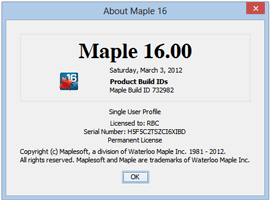
Maplesoft Maple.16.00 (x86 & x64) incl. patchFree Download Maplesoft Maple.16.00 (x86 & x64) incl. patch. Sahabat [civiliana], software yang kami posting kali ini Maplesoft Maple 16 mungkin bisa dibilang software yang sudah agak jadul, karena saat ini Maplesoft sudah merilis Maple versi 17. Namun mengingat fungsi dan kegunaannya, kami putuskan tetap memposting Maple 16 ini. Karena saat ini masih banyak sahabat [civiliana] yang tetap meminta software Maple 16 ini... Untuk feature-featurenya, kalau ingin tahu sahabat [civiliana] lihat saja langsung di situs resminya, ya... :D
O iya sahabat [civiliana] sekedar informasi, bahwa pada waktu lalu kami juga sempat memposting Maplesoft Maple 15 - full crack.
Selanjutnya untuk persyaratan sistem yang dibutuhkan oleh Maple 16 ini, silahkan dilihat pada keterangan dibawah.
Screenshoot :
Microsoft Visio Professional 2013
SYSTEM REQUIREMENTS :
  • Processor:
    Pentium III ; 1 GHz Processor or higher;
  • Memory:
    Memory 2 GB of RAM (recommended);
  • Hard disk:
    2 GB Harddisk Space;
  • Operating system:
    Windows XP, Windows 2008 Server, Windows Vista, Windows 7 or Windows 8;
  • Graphics:
    16-bit color at 1024 by 768 (or greater) resolution recommended;
  • Other:
    Java Runtime Environments 1.6.0 or Higher Installed.
Note : Compatible with Windows 32-bit and 64-bit.
* Testing by [civiliana] with Windows 8 Enterprise 64-bit.

Official Site : http://www.maplesoft.com

Thursday, June 14, 2012

ebook - Microsoft Project 2010 : Step by Step

Microsoft Project 2010 : Step by Step | Carl Chatfield, PMP and Timothy Johnson, MCP | Microsoft Press | 2010 | English | 505 p | pdf | 29.41 MB | ISBN: 0735626952 | Microsoft Project 2010 is a powerful program that helps you plan and manage a wide range of projects. From meeting crucial deadlines and budgets to selecting the right resources, Project 2010 offers easier and more intuitive experiences to help you be more productive and realize better results. If you’re upgrading to Project 2010 from a previous version, you’re probably most interested in the differences between the old and new versions and how they will affect you. The following sections list new features you will want to be aware of, depending on the version of Project you are upgrading from.
ebook - Microsoft Project 2010 : Step by Step
Book Title
:
Microsoft Project 2010 : Step by Step
Author
:
Carl Chatfield, PMP and Timothy Johnson, MCP
Publisher
:
Microsoft Press
Year
:
2010
Language
:
English
Page
:
505
File Format
:
pdf
File Size
:
29.41 MB
Introducing Microsoft Project 2010
Microsoft Project 2010 is a powerful program that helps you plan and manage a wide range of projects. From meeting crucial deadlines and budgets to selecting the right resources, Project 2010 offers easier and more intuitive experiences to help you be more productive and realize better results. You can use Project to:
  • Create project plans at the level of detail that’s right for your project. Work with summary data initially or shift to a more detailed approach when it’s convenient. Control what tasks Project can schedule automatically or that you’ll schedule manually.
  • Manage tasks, costs, work, and resources at whatever level of detail is appropriate for your project’s needs.
  • See your project plan data in a variety of views. Apply grouping, highlighting, sorting, and filtering to see your data the way that you want.
  • Track and manage your project plan throughout project execution.
  • Collaborate and share data with others in your organization using a variety of productivity applications.
  • Use resource pools, consolidated projects, and cross-project links to extend your project management focus across multiple projects.
Project 2010 builds on previous versions to provide powerful project management tools. This introduction provides an overview of new features that we explore throughout the book.
New Features
If you’re upgrading to Project 2010 from a previous version, you’re probably most interested in the differences between the old and new versions and how they will affect you. The following sections list new features you will want to be aware of, depending on the version of Project you are upgrading from.
Contents at a Glance
Table of Contents
Introduction
Part 1 Simple Scheduling
1
A Guided Tour of Project
2
Creating a Task List
3
Setting Up Resources
4
Assigning Resources to Tasks
5
Formatting and Sharing Your Plan
6
Tracking Progress on Tasks
Part 2 Advanced Scheduling
7
Fine-Tuning Task Details
8
Fine-Tuning Resource Details
9
Fine-Tuning Assignment Details
10
Fine-Tuning the Project Plan
11
Organizing Project Details
12
Tracking Progress on Tasks and Assignments
13
Viewing and Reporting Project Status
14
Getting Your Project Back on Track
Part 3 Special Subjects
15
Applying Advanced Formatting and Printing
16
Customizing Project
17
Sharing Project Information with Other Programs
18
Consolidating Projects and Resources
Part 4 Appendices
A
A Short Course in Project Management
B
Roadmap for Developing Your Project and Project Management Skills
C
Using the Practice Files if Connected to Project Server
D
Using Microsoft Project 2010 Step by Step in a Classroom: Suggestions for Instructors
Glossary
Index

Thursday, May 17, 2012

Nitro PDF Professional 7.4.1.1 (x86/x64)

Nitro Pdf Professional 7.4.1.1
Nitro PDF Professional adalah salah satu software yang sangat powerfull, untuk mengelola file dokumen kerja anda. Nitro PDF profesional, berguna untuk membuat, mengubah, mengedit, menggabungkan, menganotasi, mengisi formulir, dan menyimpan file PDF dengan standar industri 100%. Anda dapat mengkonversi file Dokumen ke PDF atau sebaliknya.
Membuat, melihat & mengedit semua dokumen PDF Anda dan mendapatkan kendali penuh atas PDF Anda dengan hanya satu aplikasi. Membuat PDF dari Microsoft Office dengan satu klik dan mudah mengkonversi lebih dari 200 jenis file ke PDF. Menyalin, mengedit, dan memasukkan teks, grafis dan seluruh halaman. Menambahkan halaman, penomoran halaman, tanggal dan waktu-perangko. Menambahkan navigasi bantu seperti bookmark dan hyperlink. Untuk pengguna bisnis, Nitro memungkinkan Anda: markup dan review dokumen menggunakan sticky notes, highlighting, and comments. Mengkonfigurasi pengaturan keamanan, dan mengontrol hak pengguna lain untuk mencetak, mengedit, dan/atau menyalin pekerjaan Anda.
Features :
  • Creating PDF-documents from more than 300 file types.
  • onvert and merge multiple files into a PDF-document
  • Batch mode for converting files to PDF-format
  • Scan to PDF-format
  • Creating a PDF from Microsoft Word, Excel and PowerPoint, by pressing a single button
  • Automatic generation of" smart "PDF-documents with bookmarks, links, meta-data and the protection of Microsoft Office
  • Copy text with formatting
  • Export PDF for later in the program separate Microsoft Word, WordPerfect, OpenOffice and other office programs
  • A full export text and images from PDF-document
  • Batch mode for converting several documents
  • Inserting and editing text, including fonts, colors, size, etc.
  • Edit images - delete, add, resize, rotate, crop, replacement and removal
  • Editing images - brightness, contrast, saturation, etc.
  • Editing a PDF-document pages - insert, delete, rotate, crop, removal and replacement of elements
  • Adding headers and footers, watermarks, and text for all pages of the document
  • Add and edit bookmarks and hyperlinks
  • Auto-create links based on keywords and page numbers
  • Optimization, compression and recovery of PDF-documents
  • Edit document properties including metadata and initial view settings
  • Selecting text content using a selection tool, underscores, and crossing
  • Manually adding images, using the" Pencil "
  • Adding shapes to your images, such as lines, arrows, rectangles, ovals, polygons and clouds
  • Adding marks on document pages
  • The possibility of application documents
  • Adding text feedback
  • Sort and manage comments
  • Sending a document to print to the printer
  • Pleasant and stylish user interface in the style of Microsoft Office 2007
System Requirements :
  • Desktop : Windows® XP, Windows® Vista, Windows® 7 (x64 editions supported)
  • Processor : 1 gigahertz (GHz) or faster processor
  • RAM : 512 MB system memory (1 GB recommended)
  • Display : 1024x768 screen resolution
  • Available Space : Up to 520 MB of available hard drive space
  • Microsoft Office 2003 or newer (required for Microsoft Office integrated features)
  • Microsoft .NET Framework 2.0 (or above)
Official Site : http://www.nitropdf.com

Saturday, May 5, 2012

ebook - Microsoft® Access® 2010 VBA Programming Inside Out

Microsoft® Access® 2010 VBA Programming Inside OutBook Title : Microsoft® Access® 2010 VBA Programming Inside Out
Author : Andrew Couch
Publisher : O’Reilly Media, Inc.
Year : 2011
Language : English
Page : 738
File Format : pdf
File Size : 24.44 MB
Free download ebook - Microsoft® Access® 2010 VBA Programming Inside Out. Microsoft Visual Basic for Applications (VBA) is an exceptional programming language and environment. The language has grown out of a need to have a programming language that would allow more business-focused individuals to write programs, but equally support the programming features that developers look for in a product. The environment is as important as the language because of its unique features, allowing code to be quickly modified while being debugged.
The Access Basic language in early product versions evolved into the VBA language, which provided a cross-product language for the Microsoft Office products. This all coincided with the revolution of an event-driven approach to programming, which was very important, because the emphasis on being a programmer shifted from writing thousands of lines of code to writing snippets of code in response to events. This also led to a change of emphasis from writing large libraries of code to understanding how to manipulate the object models in the environment—a focus which has progressed with .NET, albeit using namespaces instead of object models.
Even with the introduction of object-oriented programming, VBA has kept pace with the expectations of modern programming. The two products that have shaped VBA the most are Microsoft Excel and Microsoft Access; Excel introduced VBA and originally gained VBA programming features in advance of these becoming available within Access.
A significant strength of VBA is that it is universal to the Microsoft Office suite of programs; all the techniques we describe in this book can be applied to varying degrees within the other Office products. A major turning point for these products was the ability through OLE Automation to be able to drive one product from another, and to cut and paste code between the different environments with a minimum amount of change to the code. This was a revolutionary feature introduced with the programming language of Access Basic, conforming to the new VBA standard established in Excel. VBA suddenly provided the longawaited platform for the simple integration of the Office products and building solutions that could easily exploit the strengths of each component product in the Office suite. The combination of Access and VBA offers an extremely productive environment within which to construct applications.
VBA has often been criticized for its simplicity as a language when compared to languages such as C++ and C#. Quite to the contrary, the big advantage of VBA is that this simplicity leads to more easily maintainable and reliable code, particularly when developed by people with a more business-focused orientation to programming. Looking toward the future, the emphasis in modern programming has moved from the language syntax to the intricacies of understanding the objects that the language manipulates, so the emphasis on the specific syntax of languages is starting to blur.
In the .NET world, the conflict between using VB.NET, which originates from VBA, and C# continues, because even though the objects being manipulated are now common, there are subtle differences between the languages, which means that developers moving from VBA to C# can often feel that they are being led out of their comfort zone, especially when they need to continue to use VBA for other applications.
Contents at a Glance
PART 1
:
VBA Environment and Language
Chapter 1
:
Using the VBA Editor and Debugging Code
Chapter 2
:
Understanding the VBA Language Structure
Chapter 3
:
Understanding the VBA Language Features
PART 2
:
Using Functions in Your Formulas
Chapter 4
:
Applying the Access Object Model
Chapter 5
:
Understanding the Data Access Object Model
PART 3
:
Working with Forms and Reports
Chapter 6
:
Using Forms and Events
Chapter 7
:
Using Form Controls and Events
Chapter 8
:
Creating Reports and Events
PART 4
:
Advanced Programming with VBA Classes
Chapter 9
:
Adding Functionality with Classes
Chapter 10
:
Using Classes and Events
Chapter 11
:
Using Classes and Forms
PART 5
:
External Data and Office Integration
Chapter 12
:
Linking Access Tables
Chapter 13
:
Integrating Microsoft Office
PART 6
:
SQL Server and SQL Azure
Chapter 14
:
Using SQL Server
Chapter 15
:
Upsizing Access to SQL Server
Chapter 16
:
Using SQL Azure
PART 7
:
Application Design
Chapter 17
:
Building Applications
Chapter 18
:
Using ADO and ADOX

Friday, April 20, 2012

ebook - Access® 2010 Bible

Access® 2010 BibleBook Title : Access® 2010 Bible
Author : Michael R. Groh
Publisher : Wiley Publishing, Inc.
Year : 2010
Language : English
Page : 1395
File Format : pdf
File Size : 29.01 MB
Free download ebook - Access® 2010 Bible. Welcome to the Microsoft Access 2010 Bible, your personal guide to a powerful, easy-to-use database-management system. This book is in its eleventh revision and has been totally rewritten for Microsoft Access 2010 with new text, new pictures, and a completely new and improved set of example files.
This book examines Access 2010 with more examples than any other Access 2010 book. I strongly believe that Microsoft Access is an excellent database manager and the best desktop and workgroup database-development system available today. My goal with this book is to share what I know about Access and, in the process, help make your work and your life easier.
This book contains everything you need in order to learn Microsoft Access to a mid-advanced level. The book starts off with database basics and builds, chapter by chapter, on topics previously covered. In places where it’s essential that you understand previously covered topics, I present the concepts again and review how to perform specific tasks before moving on. Although each chapter is an integral part of the book as a whole, each chapter can also stand on its own and has its own example files. You can read the book in any order you want, skipping from chapter to chapter and from topic to topic. (Note that this book’s index is particularly thorough; you can refer to the index to find the location of a particular topic you’re interested in.)
The examples in this book have been well thought out to simulate the types of tables, queries, forms, and reports most people need to create when performing common business activities. There are many notes, tips, and techniques (and even a few secrets) to help you better understand Microsoft Access.
This book easily substitutes for the online help included with Access. It guides you through each task you need to perform with Access, and it follows a much more structured approach than the Microsoft Access online help, going into more depth on almost every topic and showing many different types of examples. You’ll also find much more detail than in most other books on Microsoft Access.
Contents at a Glance
Acknowledgments
Introduction
PART I
:
Access Building Blocks
Chapter 1
:
An Introduction to Database Development
Chapter 2
:
Creating Access Tables
Chapter 3
:
Designing Bulletproof Databases
Chapter 4
:
Selecting Data with Queries
Chapter 5
:
Using Operators and Expressions in Access
Chapter 6
:
Working with Datasheet View
Chapter 7
:
Creating Basic Access Forms
Chapter 8
:
Working with Data on Access Forms
Chapter 9
:
Presenting Data with Access Reports
PART II
:
Programming Microsoft Access
Chapter 10
:
VBA Programming Fundamentals
Chapter 11
:
Mastering VBA Data Types and Procedures
Chapter 12
:
The Access Event Model
Chapter 13
:
Accessing Data with VBA Code
Chapter 14
:
Debugging Your Access Applications
Chapter 15
:
Using Access Data Macros
PART III
:
More-Advanced Access Techniques
Chapter 16
:
Working with External Data
Chapter 17
:
Importing and Exporting Data
Chapter 18
:
Advanced Access Query Techniques
Chapter 19
:
Advanced Access Form Techniques
Chapter 20
:
Advanced Access Report Techniques
Chapter 21
:
Building Multiuser Applications
Chapter 22
:
Integrating Access with Other Applications
Chapter 23
:
Handling Errors and Exceptions
PART IV
:
Professional Database Development
Chapter 24
:
Optimizing Access Applications
Chapter 25
:
Advanced Data Access with VBA
Chapter 26
:
Bulletproofing Access Applications
Chapter 27
:
Using the Windows Application Programming Interface
Chapter 28
:
Object-Oriented Programming with VBA
Chapter 29
:
Customizing Access Ribbons
Chapter 30
:
Using Access Macros
Chapter 31
:
Distributing Access Applications
PART V
:
Access and Windows SharePoint Services
Chapter 32
:
Understanding Windows SharePoint Services
Chapter 33
:
Integrating Access with SharePoint
Chapter 34
:
Understanding Access Services
Chapter 35
:
Deploying Access Applications to SharePoint
PART VI
:
Access as an Enterprise Platform
Chapter 36
:
Client/Server Concepts
Chapter 37
:
SQL Server as an Access Companion
Chapter 38
:
Upsizing Access Databases to SQL Server
PART VII
:
Appendixes
Appendix A
:
Access 2010 Specifications
Appendix B
:
What’s New in Access 2010
Appendix C
:
What’s on the CD-ROM
Index


Ads-Banner Footer